Speak with a licensed insurance agent

1-855-454-9051

TTY user 711 Mon-Fri : 8am-9pm EST

Medicare Plan Finder Tool 2027: How to Compare Plans Step by Step

Reviewed by Russell Noga, Licensed Medicare Insurance Broker (all 50 states) — Last updated September 20, 2026

The Medicare Plan Finder is the official comparison tool on Medicare.gov, and for most people it is the only place that shows every Medicare Advantage plan sold in their county side by side. It is genuinely useful. It is also the single most common source of Medicare buyer’s remorse, because the way most people use it produces a confident-looking answer to the wrong question.

This guide covers what the tool does for the 2027 plan year, when the 2027 data actually appears, the handful of settings that change your results more than anything else, and the gaps the tool leaves that you have to close yourself before you enroll.

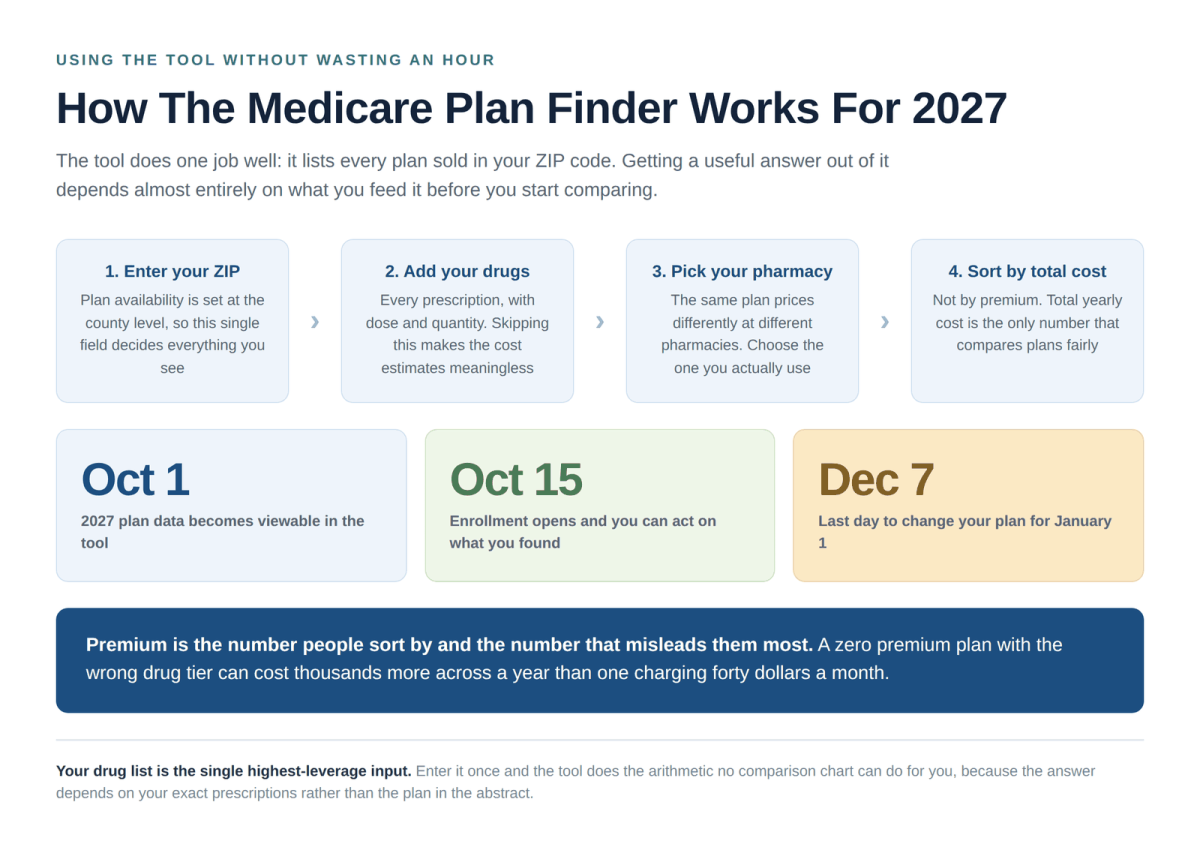
How the Medicare Plan Finder tool works for 2027 showing the four step process and key enrollment dates

Find a Plan in your area

When the 2027 Plan Data Goes Live

Plan information for 2027 becomes viewable in the Plan Finder on October 1, 2026. Before that date, everything the tool shows you is a 2026 plan, with 2026 premiums, 2026 drug tiers and 2026 networks. Pricing a plan in August tells you very little about what that plan will cost you in January.

Viewing is not enrolling

October 1 is when you can look. You cannot actually change plans until the Medicare open enrollment period opens on October 15. Use those two weeks to do your homework so you are not deciding under time pressure in late November.

The 2027 Star Ratings publish separately, in early October, and load into the tool at roughly the same time. Until they do, the star numbers you see next to each plan are the 2026 ratings. If you are shopping in the first days of October it is worth checking whether the ratings shown are current, because a plan’s rating can move a full star between years.

What You Need Before You Start

The Plan Finder is only as good as what you put into it, and almost everyone starts without the information that makes the results meaningful. Ten minutes of preparation changes the quality of the answer more than an hour of clicking.

  • Your Medicare number, if you want the tool to pull your current plan and drug list automatically. This is optional but it saves real time.
  • Every prescription you take, with the dose and how many you get per fill. Not just the drug names.
  • The pharmacy you actually use, by name and location. The same plan prices differently at different pharmacies.
  • The names of your doctors and any specialists you see regularly, for the network check you will do afterward.
  • Your ZIP code, and the county if your ZIP crosses a county line. Plan availability is set at the county level.

That last point catches people out. Some ZIP codes span two counties, and the plans available on one side of the line may not be available on the other. If the tool asks you to choose a county, the choice matters.

Using the Tool Step by Step

Step 1

Choose Medicare Advantage, not drug plans

The tool asks early on what type of coverage you want. Selecting Medicare Advantage shows plans that bundle hospital, medical and usually drug coverage together. Selecting drug plans shows standalone Part D policies that sit alongside Original Medicare instead. These are two different paths and the tool does not mix them.

Step 2

Enter every drug, then your pharmacy

This is the step people skip and the step that does the most work. Without your drug list the tool cannot estimate drug costs, so every plan looks roughly equivalent and you end up comparing premiums alone. Add the pharmacy afterward, and check both retail and mail order if you have the option.

Step 3

Sort by total yearly cost

The default sort tends to put the lowest premium first, which is exactly the wrong order. Switch to estimated total yearly cost, which adds premiums, deductibles and your drug costs together. This is where zero premium plans often drop several places down the list.

Step 4

Filter to 4 stars and up, then shortlist three

Treat the Medicare Advantage star ratings as a filter rather than a tiebreaker. Then stop at three plans. Comparing eight plans on a dozen attributes produces paralysis, not a decision, and the difference between your third and eighth choice is almost always smaller than the difference between enrolling and not.

Step 5

Verify your doctors by phone before enrolling

Call each doctor’s office directly, name the exact plan, and ask two things: do you take this plan for the coming year, and are you accepting patients under it. Do not rely on the online directory. This call is the whole reason the previous four steps were worth doing.

Find & Compare Plans Online

Speak with a licensed insurance agent

1-855-454-9051TTY 711

Mon-Fri: 8am-9pm ET

If You Already Have a Plan, Run the Check Anyway

Most people who already have a Medicare Advantage plan never open the Plan Finder again after the year they enrolled. That is the single most expensive habit in Medicare, because plans are not static. Premiums move, drug tiers get reshuffled, networks lose hospitals and benefits get trimmed, and none of it requires your consent. A plan that was the right answer two years ago may not be the right answer now, and the only way to find out is to look.

Your plan is required to send you an Annual Notice of Change by September 30 each year, spelling out what is different about your coverage for the coming year. It arrives in a thick envelope that most people put on the counter and never open. Open it. Then take the changes it describes and check them against what else is available in your county.

The three changes worth checking every year

Whether your prescriptions moved to a higher tier or left the formulary altogether. Whether your doctors and your hospital are still in network for the coming year. And whether the maximum out of pocket amount went up, since that is the number that protects you in a bad year.

Doing nothing is a decision. If you take no action during enrollment, you are automatically kept in your current plan under its new terms for the coming year, whatever those terms turn out to be. Twenty minutes in the Plan Finder each October is what turns that from a default into a choice.

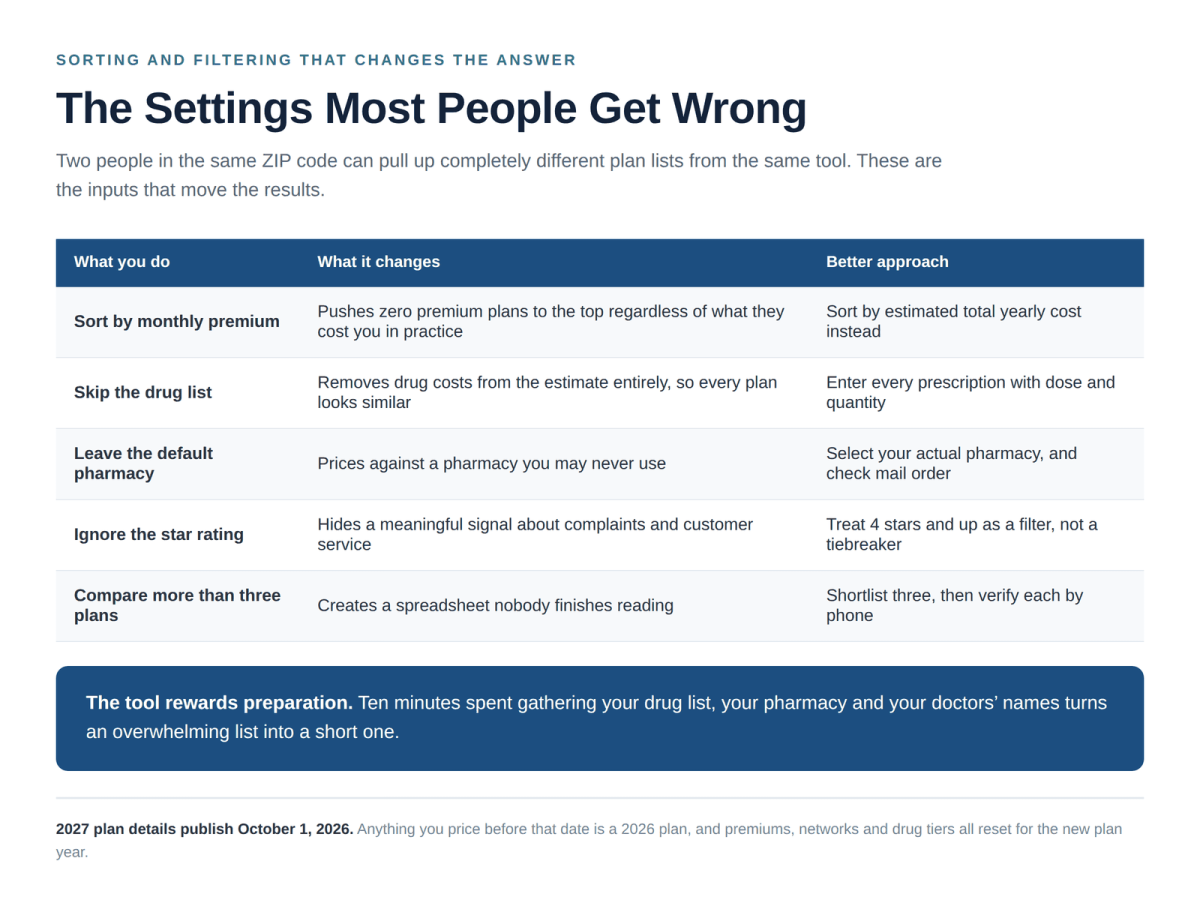
Medicare Plan Finder settings people get wrong including sorting by premium and skipping the drug list

The Settings That Change Your Results

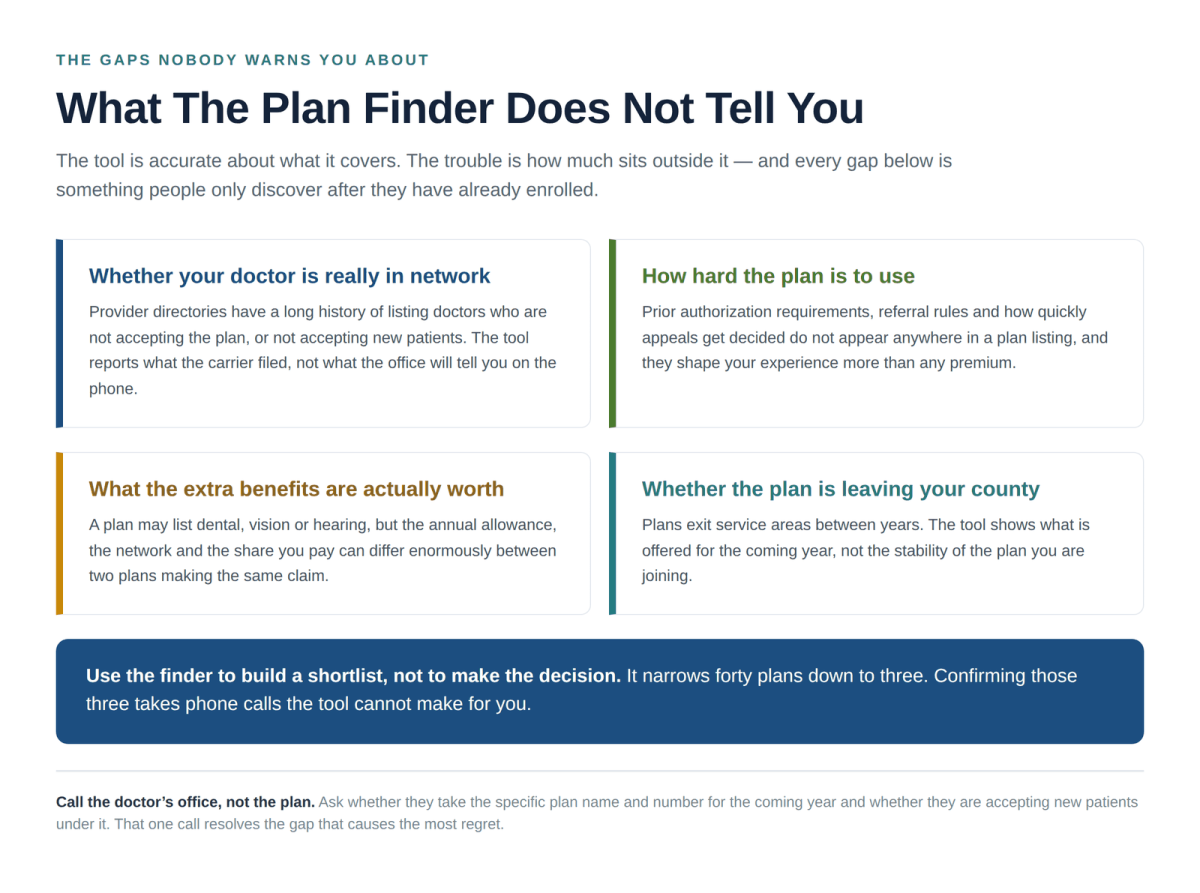
What the Medicare Plan Finder does not tell you including network accuracy prior authorization and benefit value

Two people in the same ZIP code can pull completely different plan lists out of the same tool. These are the inputs responsible.

Common approach What it costs you Better approach
Sorting by monthly premium Zero premium plans rise to the top regardless of what they cost you in practice Sort by estimated total yearly cost
Skipping the drug list Drug costs drop out of the estimate entirely, so every plan looks similar Enter each prescription with dose and quantity
Leaving the default pharmacy Prices your drugs against a pharmacy you may never set foot in Select your actual pharmacy and compare mail order
Ignoring star ratings Loses a real signal about complaints, customer service and members leaving Use 4 stars and up as a filter
Comparing eight plans at once Produces a spreadsheet nobody finishes and a decision nobody makes Shortlist three, then verify each by phone

What the Plan Finder Does Not Tell You

The tool is accurate about what it covers. The difficulty is how much sits outside it, and every gap below is something people tend to discover only after they have already enrolled.

Whether your doctor is genuinely in network

Provider directories have a long and well documented history of listing doctors who no longer take the plan, or who are not accepting new patients under it. The tool reports what the carrier filed. The doctor’s office reports what is true.

How difficult the plan is to actually use

Prior authorization requirements, referral rules and how quickly a plan decides appeals do not appear in any plan listing. They shape your experience of a plan far more than the premium does, and they vary enormously between carriers offering superficially similar coverage.

What the extra benefits are worth

Two plans may both list dental, vision and hearing, and the annual allowance, the network and your share of the cost may differ by an order of magnitude. Not all plans offer all benefits, and amounts vary by county, so the listing tells you a benefit exists rather than what it is worth to you.

Whether the plan is leaving your area

Carriers withdraw plans from counties between years, and several have done so heading into 2027. The tool shows what is offered for the coming year, not how stable that offering is. Our guide to Medicare Advantage plan changes for 2027 covers which carriers are pulling back and where.

Known Problems With the Tool, and How to Work Around Them

The Plan Finder has been rebuilt more than once and it still frustrates people every October. Most of the frustration comes from a handful of predictable places, and knowing them in advance turns a wasted afternoon into a manageable task.

What goes wrong The workaround
Plan names are nearly identical, and a county may have six variations of the same product Write down the full plan name plus the contract and plan number. That string, not the marketing name, is what identifies your plan to a doctor office
The session times out and loses the drug list you spent fifteen minutes entering Sign in with your Medicare number so the list saves to your account, or screenshot it before you start comparing
Provider search returns doctors who do not actually take the plan Use it to rule plans out, never to rule them in. A name missing from the directory is a real signal. A name present in it is a lead to verify
Early October results still show last year star ratings Check the rating year shown on the plan detail page before you weigh it, and re-check a week later if you are shopping on October 1
Cost estimates change when you revisit the same plan Confirm your pharmacy selection carried over. Switching between retail and mail order silently changes every number on the page

None of this makes the tool unusable. It does mean treating its output as a well informed first draft rather than a verdict, which is the right posture for any comparison tool covering forty plans you have never heard of.

If Your Situation Is Not Standard

The Plan Finder handles the general case well and specialized situations poorly. A few circumstances need more than the tool can give you.

  • If you have both Medicare and Medicaid, or a chronic condition a plan is built around, a Special Needs Plan may fit better than anything the standard comparison surfaces.
  • If you travel, spend part of the year in another state, or want out of network flexibility, compare Medicare Advantage PPO plans specifically rather than filtering on price alone.
  • If you are weighing carriers rather than individual plans, our roundup of the best Medicare Advantage plans for 2027 compares the national carriers on ratings, networks and cost structure.
  • If you are new to Medicare Advantage entirely, start with our overview of Medicare Advantage plans for 2027 before opening the tool at all.

The tool builds the shortlist. It does not make the decision.

Used well, the Plan Finder takes forty plans down to three in about twenty minutes. That is exactly what it is good for. The last mile, confirming your doctors, understanding the authorization rules and weighing what the extra benefits are really worth, is work the tool cannot do and should not be expected to.

What to Do Once You Have Your Three

A shortlist is not a decision, and the gap between the two is where most of the real work sits. Once the Plan Finder has narrowed things down, four steps close it out.

  • Call your doctors. Name the exact plan and ask whether they take it for the coming year and whether they are accepting patients under it. This is the call that prevents the most regret, and it takes five minutes per office.
  • Check the hospital, not just the doctor. Networks can include your primary care physician while excluding the hospital system they admit to. Ask which hospitals the plan contracts with in your area.
  • Read the Summary of Benefits for the maximum out of pocket. Premiums and copays are what you notice monthly. The out of pocket maximum is what matters in the year something goes seriously wrong.
  • Ask about prior authorization for anything you rely on. If you have a regular specialist, an infusion, imaging or durable medical equipment, ask the plan directly whether it requires approval first and how long decisions take.

You get one do-over

If you enroll in a Medicare Advantage plan and it turns out to be wrong, the Medicare Advantage Open Enrollment Period runs January 1 to March 31. During that window you may switch to a different Advantage plan once, or drop back to Original Medicare. It is a genuine safety net, though switching back to Original Medicare can raise separate questions about supplemental coverage that are worth understanding before you rely on it.

Enrollment itself can be done through the Plan Finder, directly with the carrier, or through a licensed broker. The cost to you is identical in all three cases, because commissions are paid by the carrier and are set by federal rules rather than by which door you walk through. What differs is how much of the verification work above someone does on your behalf.

Compare Plans in your area

Frequently Asked Questions

  When can I see 2027 plans in the Medicare Plan Finder?

2027 plan information becomes viewable on October 1, 2026. Before that date the tool shows 2026 plans with 2026 pricing. You can look starting October 1, but you cannot enroll or switch plans until open enrollment opens on October 15.

  Is the Medicare Plan Finder free to use?

Yes. The Plan Finder is the official tool operated by the federal government on Medicare.gov and it is free. You do not need an account to use it, though signing in with your Medicare number lets it pull your current plan and prescription list automatically.

  Why do the costs in the Plan Finder differ from what I actually pay?

The estimates assume you take exactly the drugs you entered, at the doses you entered, filled at the pharmacy you selected, for the whole year. Change any of those and your real cost changes. The estimates also cover covered services only, so care the plan denies or considers out of network does not appear in them.

  Can I trust the provider directory in the Plan Finder?

Treat it as a starting point rather than a confirmation. Network directories are known to contain doctors who have left the network or are not accepting new patients under a given plan. Always call the doctor’s office directly, name the specific plan, and confirm before you enroll.

  Should I sort by premium or by total cost?

Total yearly cost, every time. Premium alone ignores deductibles, copays and what your prescriptions cost under each plan’s formulary. A plan with no monthly premium can easily cost you more across a year than one charging a premium, depending on which tier your drugs fall into.

Have Questions?

Speak with a licensed insurance agent

1-855-454-9051

TTY users 711

Mon-Fri: 8am-9pm ET

Find & Compare Plans Online

Speak with a licensed insurance agent

1-855-454-9051TTY 711

Mon-Fri: 8am-9pm ET

ZRN Health & Financial Services, LLC, a Texas limited liability company